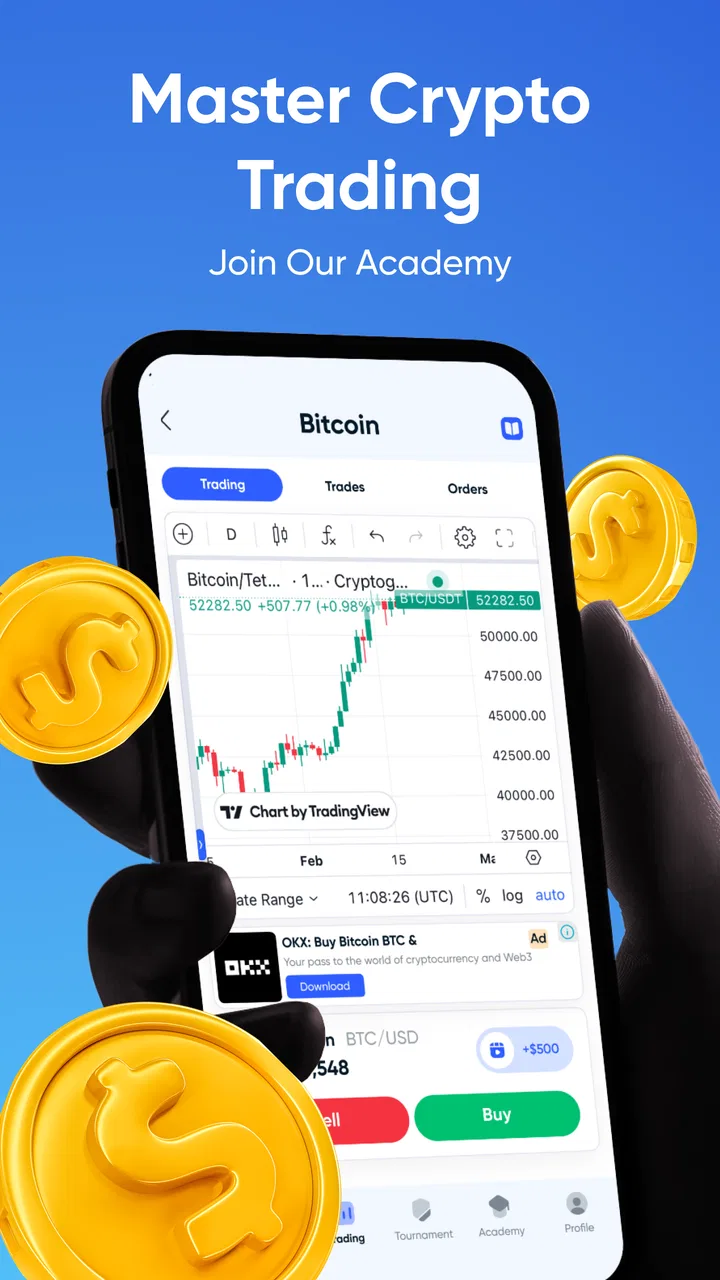
Gocrypto: Crypto Trading
- 4.5
- Rating
- 10.00M
- Installs
- Free
- Price

 Analysis by App-foxy
I approached Gocrypto: Crypto Trading as a practice tool rather than a shortcut to making money. It is a free business app from Gocrypto: Crypto Trading & Investment Simulator, built around simulated crypto trading and challenge-style learning. That distinction matters: the app is most useful when you want to test decisions, observe how a trading idea behaves, and build discipline without treating a practice result as proof that you are ready to risk cash.
My first impression was that its appeal comes from immediacy. Instead of beginning with a long explanation of blockchain terminology, it puts the focus on market-style decisions and real-time simulation. The store summary presents it as a way to master crypto trading through simulations and challenges, and that description is a fair starting point. I would recommend it to a curious beginner who wants a more active learning experience than reading articles, while I would be careful recommending it to anyone looking for a real exchange, investment account, or guaranteed path to profit.
What builds confidence, and where I would stay cautious
I would judge confidence in a trading simulator by whether it helps me separate a planned practice session from the urge to keep tapping through challenges. Gocrypto’s large audience and strong average rating are reassuring signs of broad interest, but neither tells me how well it fits my habits or goals. I’d use that distinction to look next at the practical limits of relying on a simulated experience.
You May Also Like

 Blood Strike: 2.5 Anniversary
Blood Strike’s Loadouts Turn Every Drop Into a Tactical Gamble
A close look at Blood Strike’s custom loadouts: how fast access to signature weapons reshapes its battle royale rhythm, rewards preparation, and narrows the gap between fights.

 Pandora - Music & Podcasts
Pandora’s Music Is Easy to Start, but Harder to Recover
Pandora’s strength is its low-effort path from a seed to a station. Its weak spot is how much confidence it asks you to place in connection, setup, and quiet recovery.

 8 Ball Pool
8 Ball Pool Is Built on Rivalries, Rematches, and Routine
A close look at the rivalries, rematches, shared routines, and unanswered safety questions that turn a quick pool match into a persistent mobile community.

 Samsung Music
Samsung Music’s Quiet Strength Is Playing What You Already Own
Its reach comes less from spectacle than from dependable access to a personal library. That simplicity is both the app’s strongest retention engine and its ceiling.

 AccuWeather: Weather Radar
AccuWeather Review: A Quick, Clear Forecast for Everyday Decisions
For everyday plans, the best forecast is the one you can understand quickly. AccuWeather makes rain timing, radar, and local conditions easy to act on, with a few trade-offs.

 Hill Climb Racing
Why Hill Climb Racing Still Turns Crashes Into One More Run
A tiny car, a bumpy hill and one more upgrade: Hill Climb Racing keeps resurfacing because its simple chaos makes every near-miss feel personal.
More From Our News Desk
View All News


A practice environment, not a financial promise
The most important trust question is what kind of product this actually is. Gocrypto belongs to the business category, but its central experience is simulation. That makes it different from a conventional exchange, brokerage app, or portfolio tracker. I found that distinction useful because it sets a healthier expectation: the app can help you rehearse choices, but it should not be treated as a place to deposit money or as evidence that a strategy will work in live markets.
The audience size suggests that this concept has broad appeal. It has passed ten million installs, carries an average rating of 4.5 from around 231 thousand ratings, and has about 5.2 thousand written reviews. Those figures tell me that many people are willing to try the format, but they do not replace my own judgment about suitability. A popular simulator can still be the wrong tool for someone who needs regulated financial services, detailed tax records, or direct control over real assets.
The app is free, which lowers the barrier to exploring it. That is helpful for a first session, especially if you are not yet sure whether simulated trading will hold your attention. At the same time, “free” should not be confused with risk-free learning. Your money may not be at stake in a simulation, but your habits are. If the experience encourages constant action, chasing a losing position, or confusing a successful virtual trade with skill, it can teach the wrong lesson unless you use it deliberately.
Who should use it and who should choose something else
I see three especially good audiences. The first is a complete beginner who wants to understand the rhythm of placing a hypothetical trade and watching an outcome. The second is someone who already follows crypto but wants to test an idea before acting elsewhere. The third is a learner who benefits from challenges and feedback more than from passive reading. For these users, the combination of live-feeling simulation and structured goals can make an abstract subject easier to engage with.
I would skip it if your main need is buying, selling, storing, or transferring actual cryptocurrency. A simulator cannot replace an exchange account when you need deposits, withdrawals, custody, identity checks, or transaction history. I would also choose a different option if you need professional charting, advanced order types, portfolio accounting, or a complete record for tax preparation. A dedicated market-data or brokerage product is more appropriate for those tasks.
There is another group that should approach it carefully: users who are prone to treating challenges as a competition. A challenge can make learning more motivating, but it can also encourage unnecessary trades simply to keep moving. My advice is to define a reason for every simulated position before starting. If you cannot explain what you are testing, the session is probably becoming entertainment rather than education.
How I would use it in an ordinary week
Imagine that I am commuting home and have been reading that a particular market move might continue. Instead of immediately acting on the idea through a real-money service, I would open the simulator, write down the assumption in plain language, and make a virtual decision based on that assumption. I would then note what would prove me wrong and return later to review the result. The useful part is not merely seeing whether the position wins; it is comparing my original reasoning with what actually happened.
That workflow exposes a weakness in many casual trading experiments: memory is selective. People remember the exciting wins and forget the trades that were closed too late or entered without a plan. I would keep a simple external note with the reason, expected time frame, and exit condition for each exercise. The app can provide the practice setting, but a separate journal helps turn activity into learning instead of a stream of disconnected taps.
I would also separate exploration from evaluation. During an exploratory session, I might test how a challenge feels or learn where the relevant controls are. During an evaluation session, I would take fewer decisions and judge whether the process was consistent. Mixing those two modes makes it difficult to know whether an outcome came from a considered method or from experimenting with the interface.
Controls and the importance of visible choices
Because this is a financial-learning app, I pay attention to user agency more than visual excitement. A good simulator should let me understand what I am doing before I commit a virtual action, distinguish practice results from real holdings, and leave room to stop rather than constantly nudging me into another decision. I would read each confirmation and result screen carefully instead of assuming that a familiar trading layout means the same thing as a live exchange.
That caution is especially important for people moving between several finance apps. A button that represents a hypothetical position in Gocrypto should not be mentally grouped with a button that sends a real order elsewhere. I recommend keeping the simulator separate from any live trading routine, even if both are installed on the same phone. The physical similarity of finance interfaces can make the boundary feel less clear than it really is.
Account control is another practical consideration. I would use an account name and sign-in method that I am comfortable managing, review any available profile or session settings, and avoid sharing access with another person. If I stopped using the app, I would check the account area for sign-out, deletion, or reset choices rather than simply removing the icon from my home screen. Deleting an app and closing an account are not automatically the same action.
I also would not enter sensitive information casually. A simulator does not need me to disclose more than is necessary for the experience, and I would pause whenever a screen requests personal details, financial information, or device access that does not feel clearly connected to the task. This is not an accusation about the developer; it is a sensible habit for any app that sits near financial topics. Trust should come from clear choices and understandable explanations, not from the subject matter alone.
Data-sensitive moments deserve attention
The most sensitive moments are usually not the simulated trades themselves. They are account creation, sign-in, recovery, notifications, and any screen that asks for personal information. I would read the permission prompts instead of accepting them automatically, especially if the request involves contacts, location, microphone, camera, or files. If a permission does not make sense for the action I am trying to perform, I would deny it and see whether the core experience still works.
I would apply the same discipline to notifications. Challenge reminders may help a learner return to a planned exercise, but frequent alerts can also create a sense that I must act immediately. I prefer enabling only messages that support a deliberate routine and disabling anything that turns market simulation into an always-on interruption. This is one of the simplest ways to keep the app working for me rather than allowing it to dictate my attention.
On a shared phone, I would be particularly careful with lock-screen previews. Even though the app is a simulator, notifications or account details can still reveal that I use a finance-related service. Turning off sensitive previews at the device level is a small step, but it gives me more control over who sees information when the phone is unattended.
I would also review the app after updates rather than assuming that my previous choices remain exactly as I left them. The current version is 1.3.10, and the app supports Android 8.0 or later. Version changes can alter menus, prompts, or privacy explanations. I do not treat an update as a reason for alarm, but I do treat it as a good moment to revisit account controls and notification settings.
What the age rating and developer context mean to me
The content rating is Mature 17+, which is a useful signal that this is not being positioned as a children’s learning toy. Crypto and financial decision-making can be confusing even for adults, so I would not hand it to a younger user simply because the activity is simulated. An adult beginner may still need guidance, particularly around the difference between a virtual result and an actual investment return.
The developer name, Gocrypto: Crypto Trading & Investment Simulator, makes the product’s purpose unusually clear. I appreciate that the identity points toward simulation rather than pretending to be a general-purpose banking app. Still, a clear name is only the beginning of trust. I would judge the experience by how plainly it explains actions, how easily I can control my account, and whether it keeps the boundary between practice and real finance visible.
The release date of June 17, 2024 places the app in a relatively recent phase of its product life. That can be positive because the concept may still be receiving active refinement, but it also means I would expect occasional interface changes or unfinished edges. I would keep important learning notes outside the app so that my progress does not depend entirely on one interface or one account.
Strengths that are easy to miss
One less obvious strength is that simulation can expose emotional reactions without requiring an expensive lesson. I can discover whether I tend to close too quickly after a small loss, increase activity after a win, or abandon a plan when a chart moves against me. That self-knowledge is more valuable than simply collecting successful virtual outcomes. The app works best when I use it to inspect my behavior, not to prove that I am naturally good at trading.
A second strength is the possibility of testing process rather than prediction. I would run the same basic idea under different rules: fewer decisions, a defined stopping point, and a written reason for entry. Even without turning the exercise into a formal experiment, that comparison can show whether my results depend on a repeatable method or on impulsive timing. The challenge format gives me a reason to return, while the discipline has to come from me.
A third useful insight is that real-time simulation can make time horizon visible. A decision that looks sensible over a few minutes may feel completely different when considered over a longer period. I would therefore avoid judging an approach from one short session. I would use separate notes for quick reactions and longer observations, because combining them can make a strategy look more reliable than it is.
There is also a practical advantage for people who are comparing services. By rehearsing the language and sequence of a hypothetical trade here, I can identify which concepts I do not understand before opening a real exchange. That does not make the simulator a substitute for researching fees, custody, security, and regulation elsewhere. It makes it a preparation step that may prevent me from making a real decision while still confused by basic mechanics.
Where the experience can fall short
The biggest limitation is the gap between simulated confidence and real-world pressure. A virtual loss is uncomfortable, but it does not affect rent, savings, or a financial goal. A user who performs well in the app may still react differently when real money and irreversible consequences are involved. I would never use a strong simulator result as the sole reason to begin investing.
Another limitation is that challenges can simplify a complicated subject. A goal-based format is approachable, but crypto markets involve liquidity, fees, security, custody, taxation, regulation, and technical risk. A simulator may help with decision practice without teaching every surrounding responsibility. I would pair it with independent reading and, where appropriate, advice from a qualified professional rather than assuming that completing an exercise covers the whole topic.
The free price is convenient, but it can also make the experience feel disposable. If I jump between challenges without recording what I learned, I may spend time tapping through outcomes without developing a useful framework. I would set a short objective before each session, such as testing patience or comparing two entry rules, and stop when that objective is complete.
Finally, I would not confuse the app’s rating with a guarantee of quality for my particular needs. An average of 4.5 is encouraging, and the large number of ratings indicates substantial use, but ratings compress many different expectations into one figure. Someone seeking beginner practice may be delighted, while someone wanting live execution may be disappointed for a perfectly valid reason. The right question is not whether everyone likes it; it is whether its simulation-first design matches my purpose.
My considered recommendation
After weighing the learning value against the limitations, I see Gocrypto: Crypto Trading as a sensible starting point for adults who want to rehearse crypto decisions without immediately putting money on the line. Its free access, real-time simulation focus, and challenge-oriented structure make it easier to turn curiosity into active practice. I especially like it when the user keeps a journal, limits notifications, and treats every virtual result as evidence to examine rather than a prediction of future success.
I would not recommend it as a replacement for an exchange, a regulated investment service, or a complete financial education. If I needed actual transactions, detailed account records, or professional market tools, I would choose a specialist product instead. If I wanted to understand my own reactions, test a basic idea, or learn the vocabulary and rhythm of crypto trading in a lower-stakes setting, this app would be a reasonable choice.
My final advice is to begin slowly: review the account and permission choices, keep personal information to what is necessary, disable distracting alerts, and define a learning question before each session. Used that way, the app earns its place as a practice companion. Used as a confidence machine or a promise of profit, it becomes much less trustworthy—not because simulation is useless, but because no virtual challenge can remove the uncertainty of real financial decisions.
FAQs for Gocrypto: Crypto Trading
01What is Gocrypto: Crypto Trading, and what can I use it for?
Gocrypto: Crypto Trading is a mobile-focused cryptocurrency platform designed to help users monitor digital-asset prices, review market information, and manage crypto trading activity from one place. Depending on the version and region, available tools may include price charts, watchlists, portfolio tracking, market alerts, and buy or sell functions. Users should check the current app listing to confirm which coins, services, and countries are supported.
02Is Gocrypto: Crypto Trading safe to use for buying or storing cryptocurrency?
No crypto app can remove all investment or security risks, so users should approach Gocrypto carefully. Before depositing funds, review its security options, account-verification process, privacy policy, withdrawal rules, and customer-support channels. Use a strong, unique password and enable two-factor authentication if available. Never share recovery codes, passwords, or verification details, and remember that cryptocurrency prices can change quickly.
03Does Gocrypto: Crypto Trading charge fees for transactions or withdrawals?
Trading and withdrawal costs can vary depending on the selected asset, payment method, network conditions, and the user’s location. Gocrypto may display fees before an order or transfer is confirmed, but users should still read the complete fee schedule carefully. Pay attention to trading spreads, deposit charges, blockchain network fees, conversion costs, and any minimum withdrawal requirements before adding money.
04Which cryptocurrencies and payment methods are supported in Gocrypto?
The available cryptocurrencies, fiat currencies, and payment methods may differ by country and can change as the service updates its offerings. After installation, check the market or wallet sections to see which assets are currently listed. Users should also verify whether their preferred bank card, bank transfer, or other payment option is supported, along with applicable limits, processing times, and identity-verification requirements.
05Is Gocrypto: Crypto Trading suitable for beginners in cryptocurrency?
Gocrypto can be useful for beginners who want a convenient way to follow prices and explore basic crypto trading, but it should not be treated as a guaranteed-profit tool. New users should first learn about market orders, limit orders, volatility, wallet addresses, and transaction fees. Start with an amount you can afford to lose, review every confirmation screen, and avoid making decisions based solely on short-term price movements.
Pros
- Supports multiple cryptocurrencies for portfolio diversification.
- Real-time price charts help users monitor market movements.
- Simple interface makes basic trading tasks easy to find.
- Portfolio tracking provides a quick overview of holdings and performance.
- Useful for users who want crypto tools in a single mobile app.
Cons
- Cryptocurrency prices can change rapidly
- increasing the risk of losses.
- Trading availability may vary by country and local regulations.
- Fees and spreads can reduce returns
- especially on frequent trades.
- Advanced traders may find the charting and analysis tools limited.
- Account verification may be required before accessing key features.

Gocrypto: Crypto Trading
Gallery